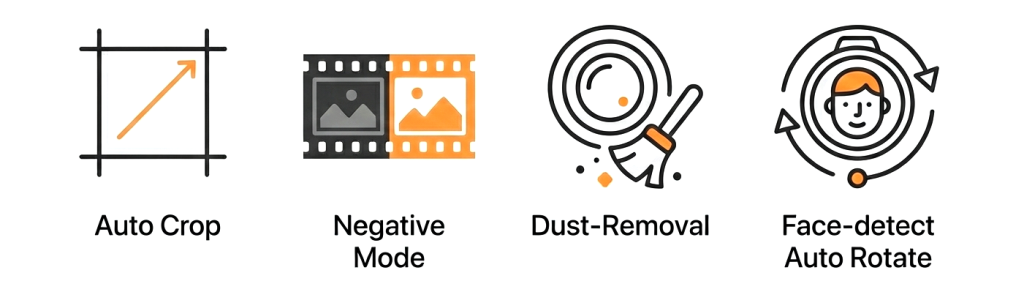
Dust Removal : Fast and automatic ( small defects )
Smart Tone : Enhance contrast and resolve fading and color shifts.
Powerful White Balance : Auto or Eyedropper.
Intuitive HotKeys : Less mouse, more speed.
Transformations : Rotate, mirror and auto de-skew.
Nondestructive Editing: No commitments until export.
Hot-Folder : Instant auto-import (during USB tether for example)
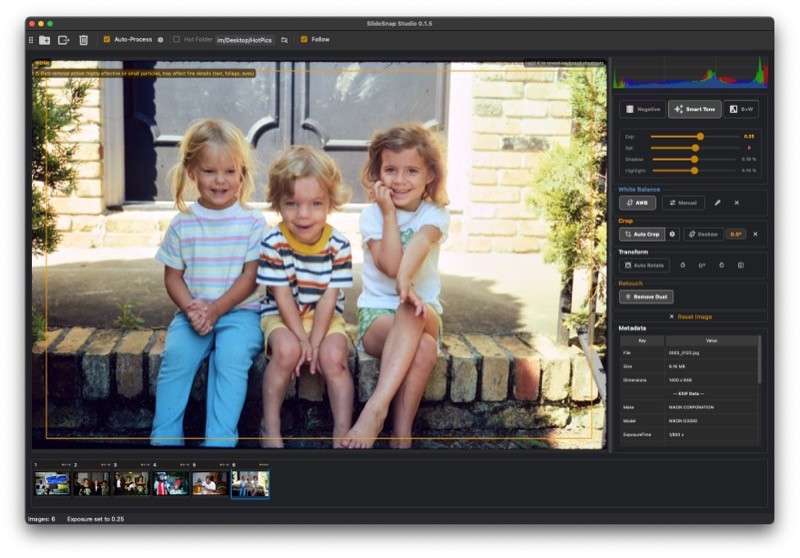
Simple, Minimal UI: Everything you need, nothing you don’t.
Sessions : Pick up your work where you left off.
Cross-platform : Mac + Windows
Optimized For Speed: Comprehensive caching and multi-threading.
Demos
Full Demo
Auto Rotate
Dust
Negatives
Auto Process
Deskew
( Filmed Dec 2025. Does not demonstrate auto face rotate, guide crop, auto process presets )
Download
SlideSnap STUDIO is free for personal use for up to 20 images at a time, no other restrictions or watermarks. For professional, unlimited use, purchase a license ( Good for 1 year of support / updates )
- [Added] Overhauled Auto White balance algorithm for accuracy and skin tones.
- [Added] Redesigned crop overlay includes a rule-of-thirds grid.
- [Added] Sequential export naming can now start at any number.
- [Changed] Numerous pipeline performance improvements.
- [Changed] Improved auto-crop guide placement detection.
- [Changed] Batch edits update in the filmstrip left to right instead of updating in a random order.
- [Changed] Filmstrip thumbnails now accurately reflect edited image.
- [Changed] Operations panel refined and now shows what's applied at a glance via colored flags.
- [Changed] Histogram and metadata visibility toggle in place.
- [Changed] Main toolbar refreshed and repositioned.
- [Fixed] EXIF rotation reading bug exported with the crop applied to the wrong part of the frame.
- [Fixed] Exported crops could land in the wrong place on mirrored or rotated images.
- [Fixed] Auto Deskew looked for frame edges in the wrong region on rotated images.
- [Fixed] Black & white strictly enforced.
- [Fixed] Auto white balance now looks only inside your crop when there is one.
- [Fixed] Reset Image now fully resets (saturation was surviving, and the before/after view could show a stale image)
- [Added] New export option "Sharpen output": applies a light sharpening pass tuned for camera-scanned film to exported images (in Advanced Options, on by default)
- [Added] New export option "Preserve metadata (JPEG)": copies EXIF metadata (capture date, camera info) from the source file into exported JPEGs (in Advanced Options, off by default)
- [Added] Color-managed input: images with a non-sRGB embedded ICC profile (e.g. Adobe RGB camera files) are now converted to sRGB at load
- [Added] Negative midtone neutralization: per-channel gamma correction, fixes color crossover from the orange mask on dense/underexposed negatives
- [Changed] Redesigned the export dialog: cleaner
- [Changed] Batch export is now multi-threaded: Typically several times faster on multi-core machines
- [Changed] Exports from 16-bit sources are now always processed at 16-bit precision regardless of output format.
- [Fixed] Crashes related to hot folders, auto rotation, and cache clearing.
- [Fixed] Auto white balance (AWB) on 16-bit TIFF exports.
- [Fixed] Auto grey point white balance no longer fails with "no neutral pixels found" on images lacking clear neutral midtones: detection now degrades gracefully (relaxed thresholds, then a grey-world estimate) so it always applies a best-effort correction.
- [Fixed] Fixed tooltip text/background contrast on Windows: tooltips now explicitly use dark background with white text instead of inheriting the system (light) palette.
- [Fixed] Rotation direction now matches the visible image when horizontal mirror is enabled.
Version 0.1.10
Released: 2026-05-07
- [Added] Windows: Now a fully signed executable ( should not product security warnings )
- [Changed] Improved stability for large image sessions.
- [Fixed] Bug: Left/Right arrow keys now reliably navigate images even after clicking sliders or other controls in the operations panel
- [Fixed] Bug: Improved Auto White Balance grey point detection accuracy - removed overly strict neutrality filter that was rejecting valid grey references with color casts
Version 0.1.9
Released: 2026-01-27
- [Changed] Improved Auto White Balance (Grey-point instead of Grey-world)
- [Changed] Improved Auto Crop frame detection for negatives.
- [Changed] Performance: Reduced memory usage by ~50% during batch operations
- [Fixed] Bug: Fixed TIFF export failing on Windows when compression enabled.
- [Fixed] Bug: Fixed Auto White Balance incorrectly detecting blue sky as grey point
- [Fixed] Bug: Pasting attributes failing to apply crop properly
Version 0.1.8
Released: 2026-01-20
- [Added] Auto-Crop Guided mode: "Use guide crop if set" checkbox in auto-crop settings. When enabled and a guide crop is set (Cmd+G), auto-crop uses the guide rectangle as a reference with edge detection to fine-tune position, compensating for frame drift between scans. Falls back to regular auto-crop if no guide is set. Guide overlay is now always visible when a guide exists, regardless of the checkbox state.
- [Added] Process Presets: Save and manage multiple auto-process configurations with built-in "Slides" and "Negatives" presets. Keyboard shortcuts 1-9 to apply presets directly to selected image(s)
- [Added] Edge-based auto-crop detection for negatives improves detection accuracy for scans with sprocket holes, frame bleed, or visible rebate markings
- [Added] Reorder images via drag and drop in filmstrip. Improved selected thumbnail outline visibility.
- [Added] New grey-point eye-dropper select white balance mode. Applies curves based correction. Better at handling color casts.
- [Changed] Improved TIFF support and export: proper LZW compression (was using zlib), horizontal predictor for 20-40% smaller files, ICC profile embedding for both 8-bit and 16-bit
- [Changed] Keyboard shortcut reorganization: Guide crop now separate from attribute copy. New mappings: Cmd+G (set guide crop), G (paste guide crop), Shift+G (smart paste guide crop), F (negative), S (smart tone), B (black & white), D (dust removal). Cmd+C/Cmd+V unchanged for attribute copy/paste. Changed hotkey for manual white balance from tilde to Shift+A
- [Fixed] Horizontal mirroring now inverts the deskew angle to maintain correct alignment
Version 0.1.7
Released: 2026-01-08
- [Added] New Export Progress Dialog: Modal dialog with animated progress bar, thumbnail preview, step-by-step status (Loading, Processing, Dust Removal, Saving), elapsed/remaining time estimates, and abort capability
- [Added] Upfront Conflict Resolution: Export now scans all destinations before starting and presents conflicts in a single interface with Skip All/Overwrite All/Rename All options
- [Changed] Improved auto-deskew algorithm
- [Fixed] Fixed crop multi-paste bug
- [Fixed] .tif files now recognized in addition to .tiff
- [Fixed] Keyboard shortcut overlay text now renders at consistent size across macOS and Windows
Version 0.1.6
Released: 2025-12-21
- [Added] Auto Rotation ( Face detection based )
- [Added] Copy/Paste Image Attributes: Cmd+C copies all image attributes (color, white balance, crop, transformations, retouch) from the current image. Cmd+V opens a dialog to select which attribute groups to paste to selected images.
- [Added] Dust Removal Preview Modes: Three preview modes - "None (Export Only)" skips dust removal in preview for fastest performance, "Fast" applies to downsampled preview image, and "Accurate" (default) applies to full-resolution before downsampling. All modes apply full-resolution dust removal at export.
- [Added] Dual Dust Export: New checkbox in export dialog to also export a version without dust removal (_orig suffix) for images that have dust removal enabled.
- [Added] Arrow Key White Balance Adjustment: When the eyedropper tool is active (U), use arrow keys to fine-tune temperature (Left/Right) and tint (Up/Down). Hold Shift for larger steps.
- [Changed] Dust removal processing improvements (Paralalel tile based) utilizes multi core CPUs.
- [Fixed] Fixed color saturation appearing differently on wide-gamut (Display P3) vs sRGB monitors.
Version 0.1.5
Released: 2025-12-09
- [Added] Zoom Magnifier: Hold Z to activate a magnifying lens that shows 100% view of the processed image, scroll wheel to adjust magnification (50%-400%)
- [Added] Deskew Tool: Fine rotation adjustment (±5°) for straightening tilted scans, with slider control and interactive rotation handle on crop overlay, plus auto-detect button using Hough line detection
- [Added] Keyboard Shortcut Overlay: Press and hold K to reveal shortcut hints over all relevant UI elements
- [Added] Export format options: Choose between JPG (Standard/High quality) and TIFF (8/16-bit, LZW compression on/off)
- [Added] Thumbnail caching for faster session restoration
- [Changed] Moved JPEG quality setting from Preferences to Export dialog (now per-export with format-specific options)
- [Changed] Clear crop button (X) now also resets deskew angle to 0°
- [Changed] Copy/paste crop now includes deskew angle (Cmd+C copies both crop and deskew, V pastes both)
- [Changed] Color panel redesigned: Negative/Smart Tone/B&W checkboxes replaced with icon toggle buttons (film, auto-adjust, B&W filter icons)
- [Changed] Keyboard shortcut changes: Auto-Crop moved from Z to C, Paste Crop moved from C to V (hold V to position before applying), Auto-Rotate (face detect) now assigned to R
Version 0.1.4
Released: 2025-12-03
- [Added] Saturation Control
- [Changed] Switched to all LAB color space
- [Changed] Shadow/Highlight clip sliders now use perceptually uniform scaling (center=0.1% default, easier fine-tuning)
- [Changed] Upgraded Auto white balance algorithm.
- [Changed] Manual white balance now uses Temperature/Tint sliders instead of RGB multipliers
- [Changed] Improved White balance eye dropper sampling
- [Changed] Improved experimental ( Mac ) tethering: Authenticates in UI. Better fault handling.
- [Changed] Misc. UI improvements
Version 0.1.3
Released: 2025-11-30
- [Added] Automatic dust reduction ( Hotkey: G )
- [Added] Auto-Process: Automatically apply operations to images as they are added.
- [Added] Disk-based cache system with LRU eviction for improved performance especially with large image sets
- [Added] Thumbnail display mode preference: Fit (show entire image) or Fill (crop to fill)
- [Added] Thumbnail size presets: Small (60px), Medium (85px), Large (110px)
- [Added] Quick Start Guide accessible from Help menu at any time
- [Added] White balance eyedropper button in the White Balance section for easier access
- [Changed] Application window now appears immediately on launch instead of waiting for session loading
- [Changed] Rebuilt quickstart guide with comprehensive documentation for all features and keyboard shortcuts
- [Changed] Thumbnails now reflect auto-levels adjustments and preserve aspect ratio without distortion for more accurate visual representation
- [Changed] Undo/redo no longer stores large image caches, reducing memory usage significantly
- [Changed] Better progress reporting for batch operations
- [Removed] Interface preferences tab (consolidated into General)
Version 0.1.2
Released: 2025-08-26
- [Changed] Fixed bug in Smart Tone tool introduced in 0.1.1
Version 0.1.1
Released: 2025-08-25
- [Added] Added keyboard shortcuts modal under Help menu
- [Added] Hold "Y" to view image before color edits.
- [Added] Adjust crop via grab-handles
- [Added] White Balance Eye-Dropper Tool (Shortcut: U)
- [Added] File conflict handling during export operations
- [Changed] Updated thumbnail edit flags: cropped (orange), negative (purple), black+white (grey), smart tone (white), removed rotation flag
- [Changed] Re-arranged menu / toolbar structure
- [Changed] Improved hot folder selection logic
- [Changed] Tweaked UI ( Clipping and WB Sliders )
- [Changed] Fixed bug where sequence of exported images was messed up
(Mac users) Should I download Mac Intel or Mac Arm? :To check which version you need, click the Apple menu → About This Mac. If you see “Chip” followed by M1, M2, M3, etc., download the Arm version. If you see “Processor” followed by Intel, download the Intel version. If your Mac was purchased before 2021, it’s almost certainly Intel. The Intel version will run on Arm chips (with reduced performance), but not vice versa—so when in doubt, Intel is the safer choice.
How to install : Unzip the contents of the downloaded file. Move the application to your Applications folder, double click to start. As of 1/9/25, Windows users may need to click “More info…”, then “Run Anyway” ( We should have this resolved for future releases )
Where is my license key? : If you purchased a license, it will have been emailed to you. Your order history can be found on the orders page.
Does SlideSnap STUDIO support RAW files? : SlideSnap Studio supports an end to end lossless 16 bit pipeline via TIFF. For RAW shooters, we recommend exporting to 16-bit TIFF from your preferred RAW processor—this preserves full quality while letting you apply your own color corrections and lens profiles.
Dust removal removed too little / too much! : While incredibly effective and helpful for many images, even after extensive tuning, algorithmic dust and scratch removal is inherently imperfect. For white dust (negatives), it can effect specular highlights, and for black dust it can alter things like tree branches and text. This is why we recommend using it sparingly and/or enabling the option in the export panel to ALSO save a copy of the image WITHOUT dust and scratch removal.
I bought a new computer, can I use the same license key? : Yes, but you first have to Deactivate the application on your old computer under Help->Manage License->Deactivate License. If you don’t have access to your old computer, please contact us.
Does the application stop working after the license expires? : No! This is not a subscription. It will continue to work indefinitely, but in order to continue to receive updates / support you will need to renew your license.
Why should I choose SlideSnap Studio over Negative Lab Pro (NLP)? : Negative Lab Pro (the popular plugin) offers a lot of image control at the cost of great complexity, lots of time and an Adobe Lightroom subscription. We’ve tuned SlideSnap Studio as a self contained application for fast, professional results in a production environment, with more automation and fewer sliders.
Built In USB Tethering ( Mac only, Experimental )
Requires administrator privileges for install and admin password at every app launch.
In the Terminal app:
Install Homebrew via : /bin/bash -c “$(curl -fsSL https://raw.githubusercontent.com/Homebrew/install/HEAD/install.sh)”
Install gphoto2 via : brew install gphoto2
Install libgphoto2 via : brew install libgphoto2
Confirm gphoto2 is functional via : gphoto2
Now, connect your camera to the computer via USB, and confirm gphoto2 sees it via: gphoto2 –auto-detect
If your camera is listed. You can now run SlideSnap Studio. Enable tethering in preferences -> advanced.
You will be asked to enter your administrator password.
There will now be a “Connect” button at the top of the UI. Click it to connect to your camera.
Capture a test image to confirm the connection is working.
Done!
( Connection can be unstable at first, you may need to reconnect a few times. )